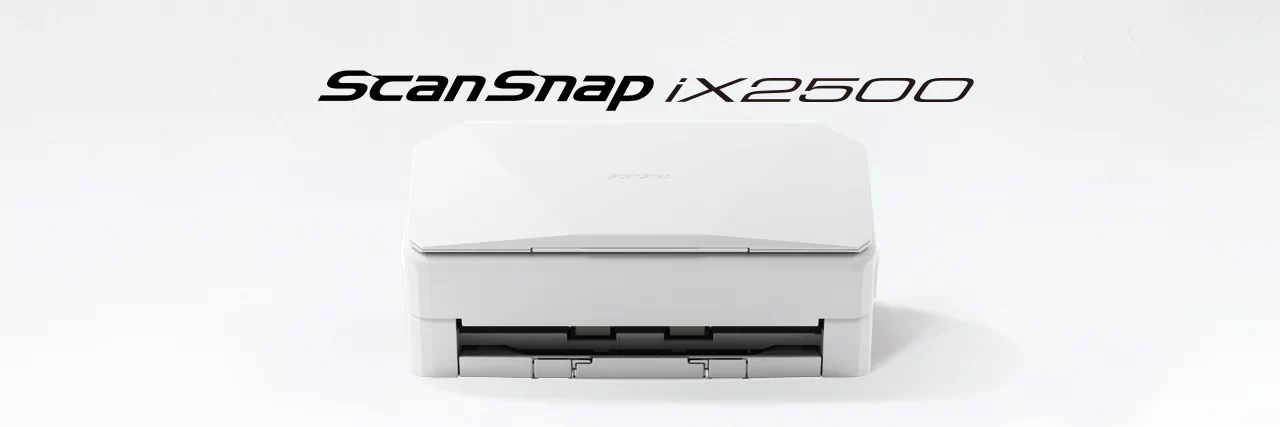
ScanSnap iX2500
Overview
How it works
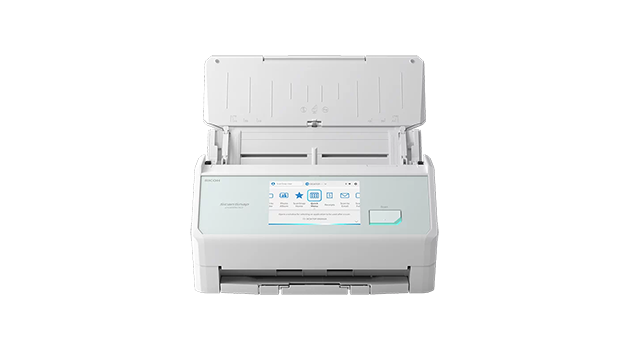
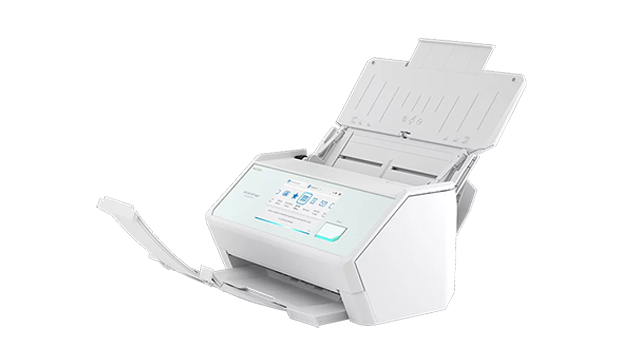
ScanSnap iX2500 is the evolved flagship model of the ScanSnap series, enabling scanning at higher speeds of 45 ppm/90 ipm (A4-size documents, color, 300 dpi). It comes with a large 5-inch touch screen to bridge the gap where the physical and digital meet. The device allows you to use your personalized settings anywhere, regardless of whether you are at home, the office, or a rental coworking space. It integrates seamlessly with digital services for utilizing scanned data and offers a user-friendly, stress-free experience.
Our flagship model scans more documents faster and offers greater connectivity for easier access to shared data from anywhere
- Intuitive 5-inch touch screen and smartphone-like usability
- Wi-Fi (2.4 / 5GHz*1) compatibility
- Secure connections with Wi-Fi 6/WPA3 support
- Speedy scans up to 45 ppm/90 ipm (A4-size documents, color, 300dpi)
- 100 sheets Automatic Document Feeder (ADF)
- For both individual and team use
- Balances high-speed scanning and fast startup with energy efficiency
- Best experiences with ScanSnap Home
- Your usual settings and cloud save destinations are applied to the scanner
- Data Sync*2: Transcending device boundaries
- Save directly to a network folder and cloud services, or send to email without the need for a PC
- Seamless integration with various digital services
- Environmentally conscious product design and packaging materials
Features
Whether in the office, at home, or in a coworking space, instantly apply your personal scan settings to enjoy smooth scanning
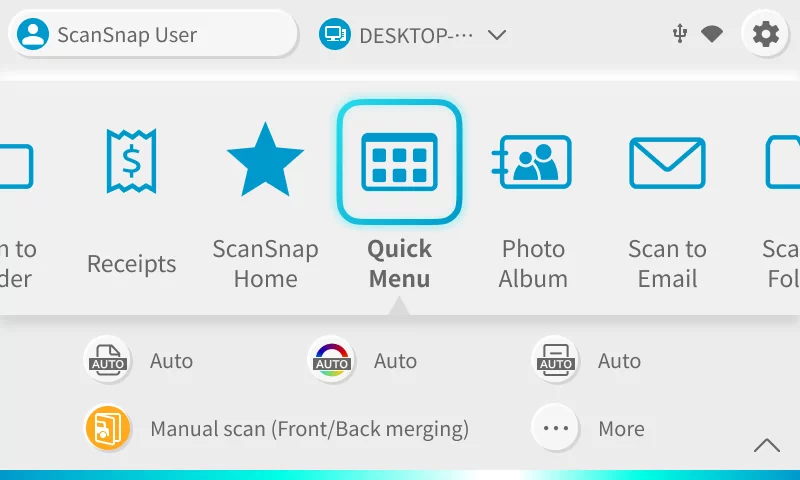
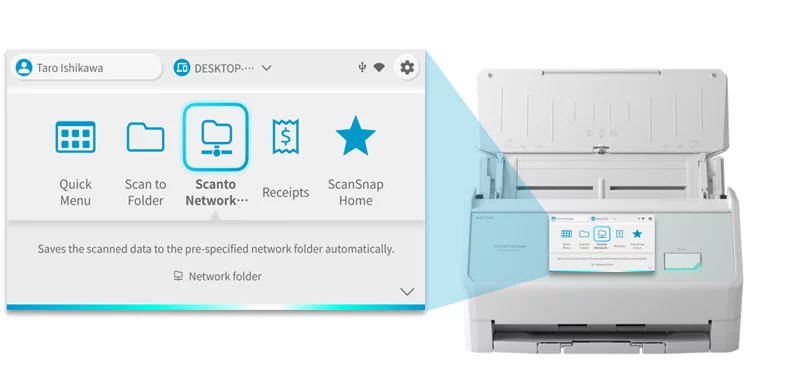
The large 5-inch touch screen with improved response allows you to view scan profiles created on your PC or smartphone as visual icons, such as saving destinations to PC folders or cloud services linked with ScanSnap Cloud. Furthermore, detailed scan settings, such as file format, color, image quality, and two-page stitching, can be configured on the touch screen, enabling the intuitive operation of the scanner.
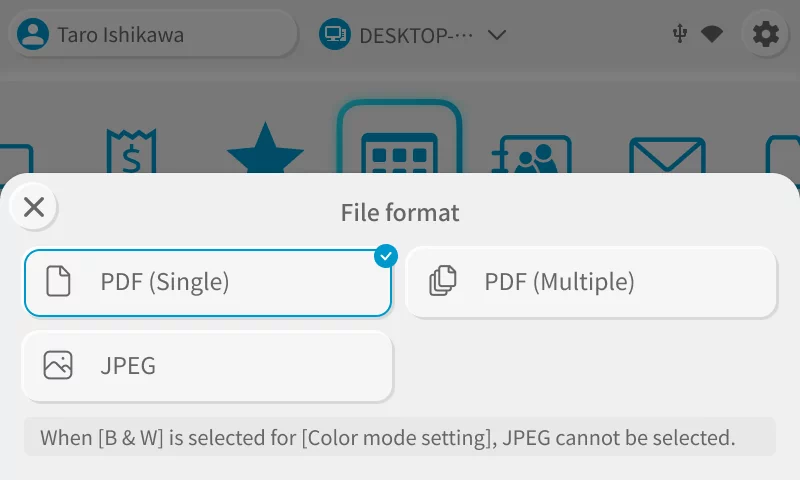

Your usual settings and cloud save destinations are applied to the scanner
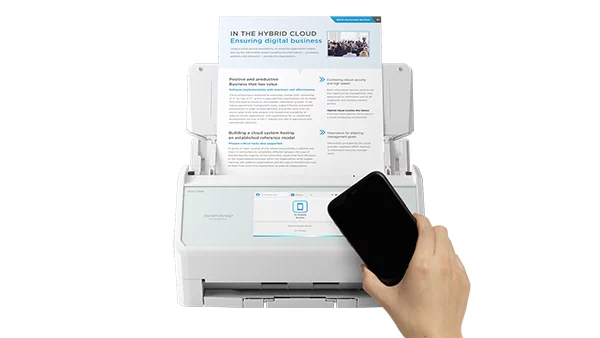
Use the ScanSnap iX2500 on any office floor or a rental coworking space with your own settings and save destinations! By connecting a device to the ScanSnap iX2500, your usual settings and cloud save destinations are applied to the scanner, allowing any ScanSnap iX2500 to function as your personal scanner. In addition, you can temporarily apply your usual settings to the ScanSnap iX2500 by bringing your smartphone close to it.* Instantly access your usual settings with just a smartphone. Convenient but secure short-term use is available for a shared environment.
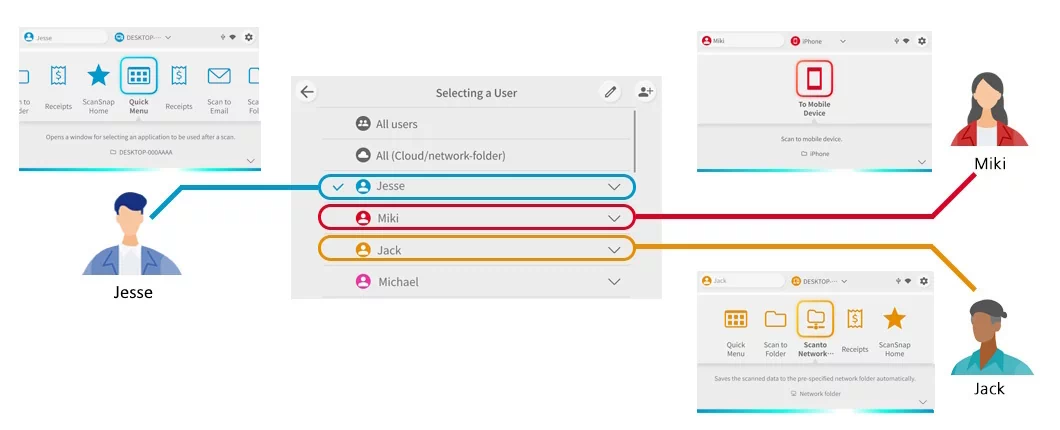
Intuitive user interface ideal for teams, families, and shared use
You can easily switch users on the touch screen to display your settings and icons, allowing you to scan without hesitation, even for shared use.
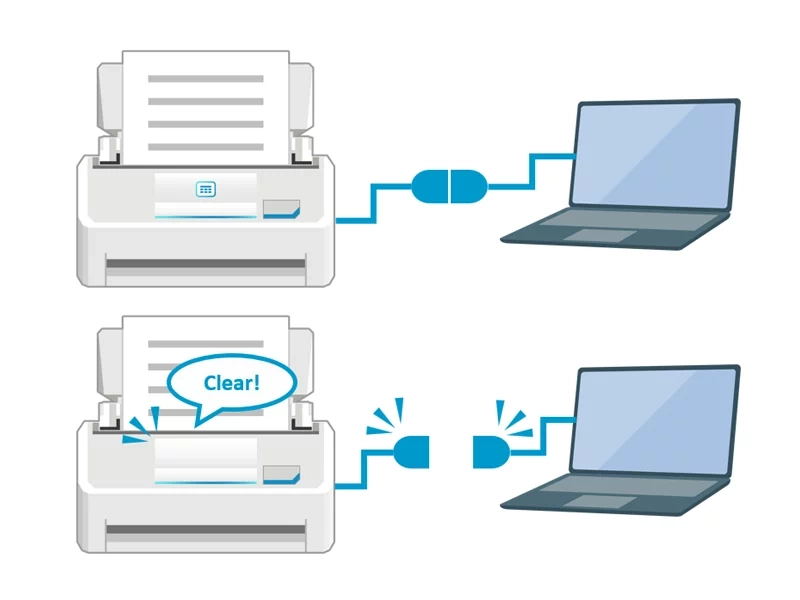
Privacy mode for peace of mind, even in environments used by many people
The Privacy mode of the iX2500 displays profile icons on the touchscreen only while the iX2500 is connected to a PC, smartphone, or tablet. Once the connection is severed, the profile information is deleted from the iX2500 unit, and the profile icons on the touchscreen disappear. This function ensures peace of mind when using the device in public spaces or coworking spaces where it may be used by many people.

Seamless integration with various digital services*1
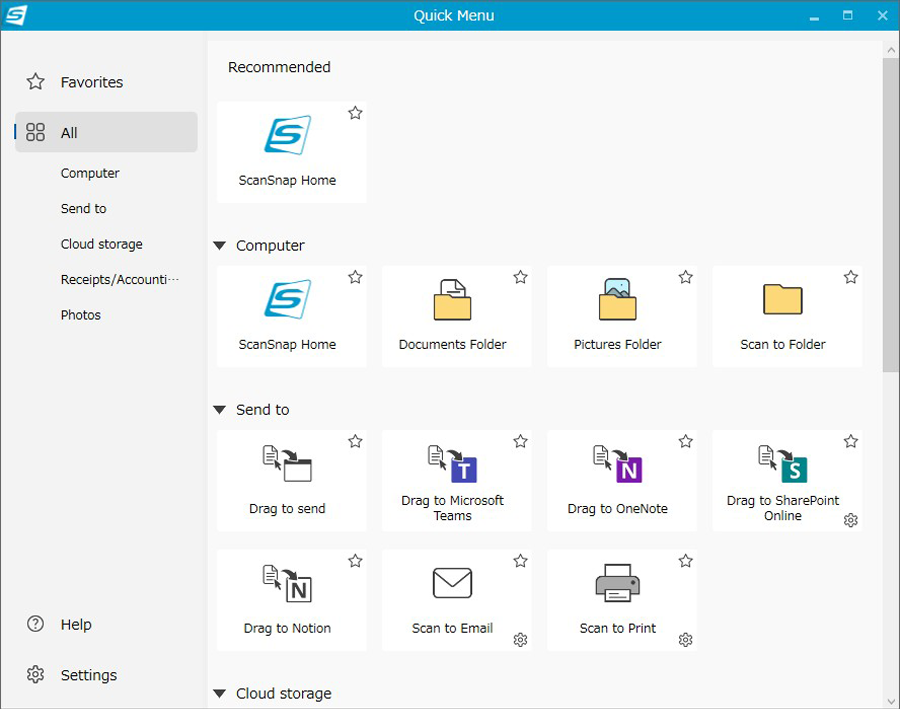
ScanSnap Home for PC has a revamped Quick Menu, which allows you to select saving and integration destinations after scanning. In addition to traditional options like folder saving and email sending, new integrations with Microsoft Teams, SharePoint, OneNote, Notion, and iCloud have been added.*2 For Microsoft Teams, OneNote, SharePoint, and Notion, the target applications' windows are opened, making data sharing a breeze. Moreover, various cloud services linked to the ScanSnap Cloud service*3 that would enable direct saving to the cloud are also suggested on the Quick Menu.
Stress-free usability on a PC, smartphone, or PC-free
With a new scan engine and the next-generation iiGA SoC, the ScanSnap iX2500 offers a stress-free and comfortable user experience.
Comfortable scanning with ultra high speed performance and large capacity
Scans A4 color duplex documents at 45 pages per minute and 90 images per minute for stable, high-speed scanning on PCs, as well as smartphones, and tablets. The maximum ADF capacity is 100, and even when the Receipt Guide is installed, 50 A4 sheets can be loaded, making it easy to scan large volumes of documents.
Wi-Fi connectivity for both smartphones and PCs
The ScanSnap iX2500 supports Wi-Fi (2.4 GHz and 5 GHz bands) and enables wireless saving to smart devices and the cloud without needing a PC. With Wi-Fi 6 (IEEE 802.11ax) compatibility, the scanner ensures robust and stable communication, even in environments with radio interference and congestion. Additionally, it supports the WPA3 security protocol and TLS 1.3, safeguarding your valuable information.
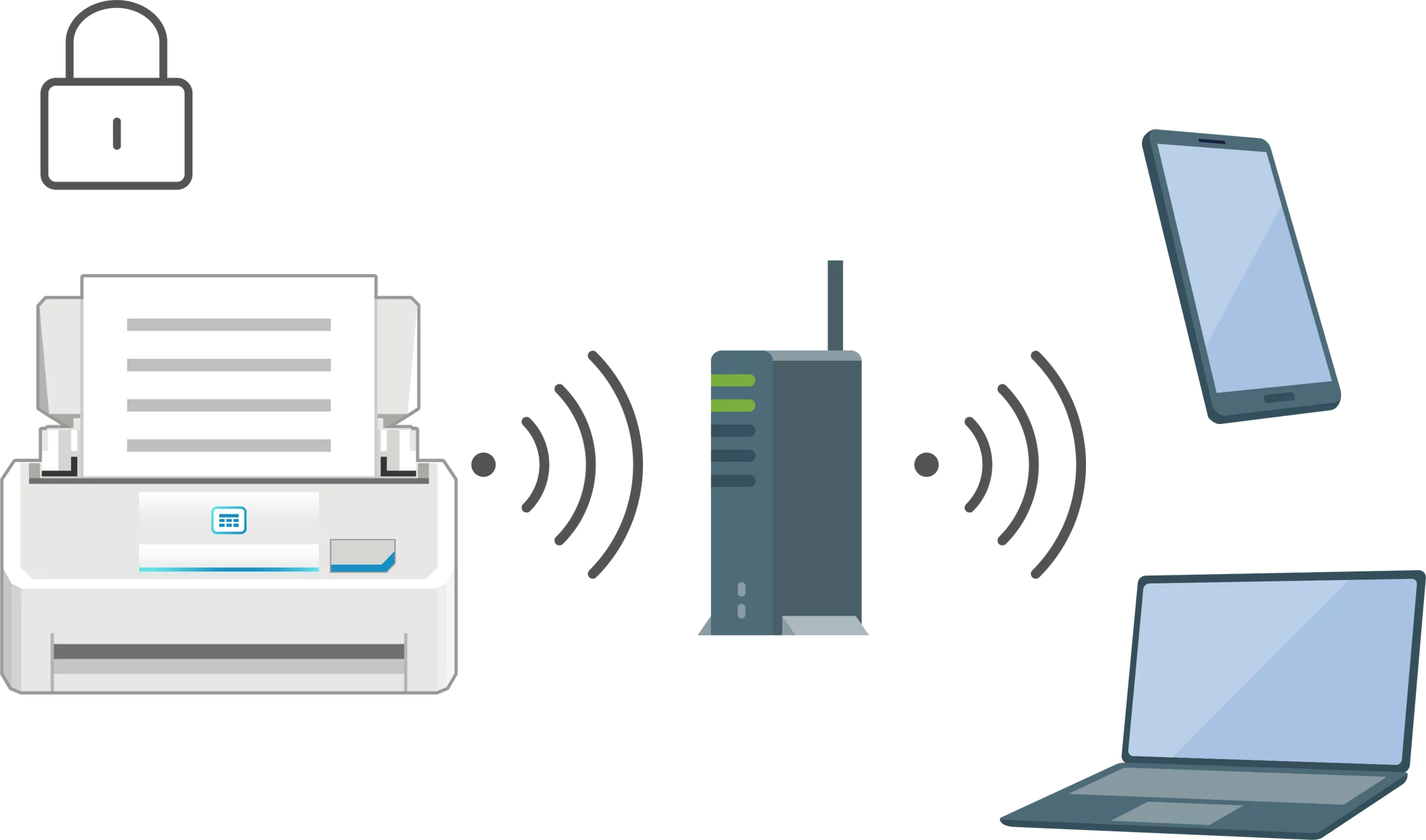
Save directly to a network folder*1*2 and cloud services, or send to email without the need for a PC
Save scanned data directly to network-attached storage (NAS) and to cloud services ScanSnap Cloud supports without a PC via touch screen operation. Scanned data can also be sent via email using the icon (profile) to which a destination email address has been assigned in advance.
Less plastic waste
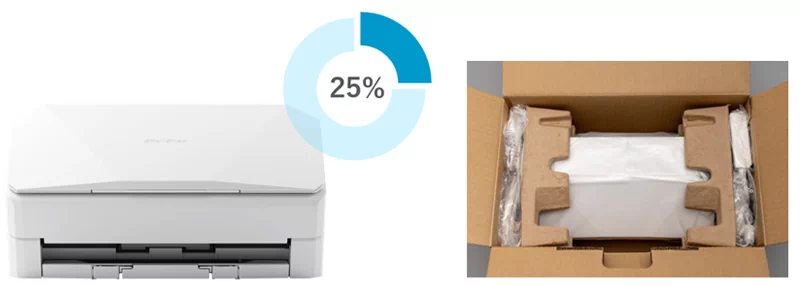
Recycled plastic is over 25% of the main unit's resin weight. We also use recycled plastics* and pulp molds for packaging and cushioning materials when transporting products, achieving zero use of virgin plastics derived from fossil resources. These contribute to reducing plastic waste.
Energy-saving features minimize the environmental impact
Industry-leading energy-saving performance with a power consumption of 17 W during operation, 1.0 W during sleep mode with USB connection. In addition, after ten minutes of inactivity of the scanner, the scanner automatically enters sleep mode, reducing unnecessary power consumption. Please refer to RICOH Image Scanners Environment for more information on our eco-friendly initiatives in our scanner products.
Specifications
| Product Name | ScanSnap iX2500 (White / Black) |
| Scanner Type | ADF (Automatic Document Feeder) / Manual Feed, Duplex |
| Scanning color mode | Color, Grayscale, Monochrome, Automatic (Color/Grayscale/Monochrome*1 detection) |
| Image sensor | CIS x 2 (Front x 1, Back x 1) |
| Light source | 3 Color LED (Red/Green/Blue) |
| Optical resolution | 600 dpi |
| Scanning Speed*2 (A4 portrait) - Auto mode(Default)*3 | Simplex / Duplex: 45 ppm |
| Scanning Speed*2 (A4 portrait) - Normal mode | Simplex / Duplex: 45 ppm (Color / Grayscale: 150 dpi, Monochrome: 300 dpi) |
| Scanning Speed*2 (A4 portrait) - Better mode | Simplex / Duplex: 45 ppm (Color / Grayscale: 200 dpi, Monochrome: 400 dpi) |
| Scanning Speed*2 (A4 portrait) - Best mode | Simplex / Duplex: 45 ppm (Color / Grayscale: 300 dpi, Monochrome: 600 dpi) |
| Scanning Speed*2 (A4 portrait) - Excellent mode*1 *4 | Simplex / Duplex: 13 ppm (Color / Grayscale: 600 dpi, Monochrome: 1,200 dpi) |
| Document Size - Normal Scan*5 | Minimum 50.8 x 50.8 mm (2 x 2 in.) Maximum 216 x 360 mm (8.5 x 14.17 in.) |
| Document Size - Manual Scan | Minimum 50.8 x 50.8 mm (2 x 2 in.) Maximum 216 x 360 mm (8.5 x 14.17 in.)*7 |
| Document Size - With Photo Carrier Sheet (Option)*1 | Minimum 25.4 x 25.4 mm (1 x 1 in.) Maximum 127 x 178 mm (5.0 x 7.0 in.) |
| Document Size - With Carrier Sheet (Option)*1 | Minimum 25.4 x 25.4 mm (1 x 1 in.) Maximum 297 x 431.8 mm (11.69 x 17 in.) |
| Document Size - With Booklet Carrier Sheet (Option)*1 | - |
| Document Size - Long Paper Scanning*6 - PC | 3,000 mm*8 (863 mm in 32-bit) |
| Document Size - Smart Device / Cloud / NAS | Duplex: 863 mm Simplex: 1,726 mm |
| Paper Weight (Thickness) | 40 to 209 g/m2 (11 to 56 lb) A8 or less: 128 to 209 g/m2 (34 to 56 lb) Cards: 0.76 mm or less (Compliant with the ISO7810 ID-1 type) (Includes embossed cards in landscape orientation) |
| ADF Capacity*9 | 100 sheets (A4, 80 g/m2 or 20 lb) |
| Interface - USB | USB 3.2 Gen1 / USB 3.1 / USB 3.0 / USB 2.0 / USB 1.1 (Connector Type: Type-C) |
| Interface - Wi-Fi | IEEE802.11a/b/g/n/ac/ax Frequency band: 2.4 GHz / 5 GHz*10 |
| Wi-Fi Connection Mode | Access Point Connect Mode (Infrastructure mode)*11 Direct Connect Mode (Ad-hoc mode)*12 |
| LCD | 5 in. color IPS touch screen |
| Power Requirements | AC 100 to 240 V, 50/60 Hz |
| Power Consumption - Operating | Approx. 17 W |
| Power Consumption - Sleep Mode(USB connection) | 1.0 W or less |
| Power Consumption - Sleep Mode(Wi-Fi connection) | 1.4 W or less |
| Power Consumption - When the power is off (default Normal mode) | 0.2 W or less |
| Power Consumption - On standby in Fast mode (Wi-Fi off) | 1.0 W or less |
| Power Consumption - On standby in Fast mode (Wi-Fi connection) | 1.4 W or less |
| Operating Environment | Temperature: 5 to 35 °C (41 to 95 °F) Relative humidity: 20 to 80% (Non-condensing) |
| Dimensions (W x D x H) | Min.: 292 x 161 x 159 mm (11.50 x 6.34 x 6.26 in.) (storage size) Max.: 292 x 477 x 286 mm (11.50 x 18.78 x 11.26 in.) (when the extension and the stacker are extended) |
| Device Weight | 3.5 kg (7.7 lb) |
| Environmental compliance | ENERGY STAR/RoHS |
| Multifeed detection | Overlap detection (Ultrasonic sensor), Length detection |
| Driver | ScanSnap Home (ScanSnap specific driver), Windows: Does not support TWAIN/ISIS™, macOS: Does not support TWAIN |
*1 Available only when connecting to a computer.
*2 Scanning speeds may vary due to the system environment. The values shown are the results of the evaluation under the following environment:
- • Windows 11 / CPU: Intel Core™ i3-13100, up to 4.5GHz / Memory: 8GB / Storage: SSD,
- • ARM-based Windows 11 / CPU: Snapdragon X 10-core 3.4GHz / Memory: 16GB / Storage: SSD,
- • macOS Sonoma 14 / CPU: Apple M2 chip / Memory: 8GB / Storage: SSD / Mac Mini (2023).
*3 Scans will be performed in 300 dpi (Color/Grayscale) or 600 dpi (Monochrome) if shorter sides are less than 105 mm, and in 200 dpi (Color/Grayscale) or 400 dpi (Monochrome) if shorter sides exceed 105 mm.
*4 This mode is not available when using ScanSnap Cloud or when saving directly to a network folder.
*5 A3 scans are possible with use of A3 carrier sheets.
*6 A document longer than A4 paper can be scanned one by one. Available in all modes except for “Excellent mode”.
*7 A3, B4, 11 x 17 in. document sizes are required to be folded in half.
*8 Up to 360 mm in Excellent mode.
*9 Maximum capacity varies, depending upon paper weight.
*10 Availability of 5 GHz Wi-Fi may vary depending on region.
*11 Access Point Connect Mode requires a Wi-Fi access point or router.
*12 5 GHz Wi-Fi is not available with Direct Connect Mode.
System Requirements for PC
| Compatible Operating Systems*1 | Windows 11 / 10 (32-bit / 64-bit) | ||||||
| Driver / Applications*2 |
| ||||||
| Hardware Requirements*3 |
|
1. ScanSnap works on Windows 11 and Windows 10 in desktop mode. It is not supported on Windows 10 Enterprise 2015 LTSB or on ARM-based Windows 10.
2. Operating systems listed in this table are the only ones supported. Please refer to the ScanSnap Support site for the latest support information.
3. The ScanSnap device may not work if the connected computer does not meet these requirements.
4. ScanSnap Home Installation requires a computer and Internet. Please visit the ScanSnap Support site for download information.
5. Please refer to the included license certificate to download the software.
6. Scanning speeds may vary due to the system environment.
7. Indicated disk capacity requirements apply when downloading ScanSnap Home.
8. .NET Framework 4.8 or later must be installed. If it is not installed, it is installed with ScanSnap Home. Up to 4.5 GB of disk space is required for the installation.
9. Kofax Power PDF Standard and ABBYY FineReader for ScanSnap do not support ARM processors. For details on ARM processor support in other third-party applications integrated with ScanSnap Home, please contact the respective manufacturer or provider.
*The system requirements may change depending on the support policies of the above system and third-party software.
System Requirements for Mac
| Compatible Operating Systems | macOS Monterey 12 or later | ||||||
| Driver / Applications*1 |
| ||||||
| Hardware Requirements*2 |
|
1. Operating systems listed in this table are the only ones supported. Please refer to the ScanSnap Support site for the latest information.
2. The ScanSnap device may not work if the connected computer does not meet these requirements.
3. ScanSnap Home Installation requires a computer and Internet. Please visit the ScanSnap Support site for download information.
4. Please refer to the included license certificate to download the software.
5. The ScanSnap device also operates with Apple Silicon-based Mac computers. Please refer to the ScanSnap Support site for the latest information.
6. Scanning speeds may vary due to the system environment.
*The system requirements may change depending on the support policies of the above system and third-party software.
System Requirements for Other Devices
For ScanSnap Home (for mobile), please refer to ScanSnap Home specifications tab.
Accessories
Consumables
| Part Number | Description | |
|---|---|---|
| Roller Set | PA03860-0001 | Lifetime: Every 200,000 sheets*1 |
| Cleaner F1 | PA03950-0352 | 100 ml bottle For use on the Brake roller and Pick roller |
| Cleaning Wipe | PA03950-0419 | 24 packets For use on the Brake roller and Pick roller |
| Cleaning Paper | CA99501-0012 | 10 sheets Use this non-woven sheet with Cleaner F1 |
Options
| Part Number | Description | |
|---|---|---|
| Carrier Sheets*2 | PA03360-0013 | Contains 5 sheets supporting photographs and various document sizes |
| Photo Carrier Sheets | PA03770-0015 | Contains 3 sheets supporting photographs (E-size, L-size, King-size), postcards, and business cards |
| ScanSnap Bag | PA03951-0651 | Stores one ScanSnap unit and accessories |
Warranty
12 Tháng
Warranty Information (Worldwide)
Find out the details about your product's warranty and information on how to extend your warranty. [Warranty Information](https://www.pfu.ricoh.com/global/scanners/fi/warranty.html) (Worldwide)